iPad Pro M4 vs Samsung Tab S10 Ultra Compared
iPad Pro M4 vs Samsung Tab S10 Ultra: display, performance, stylus, multitasking, apps, and value for money in India.
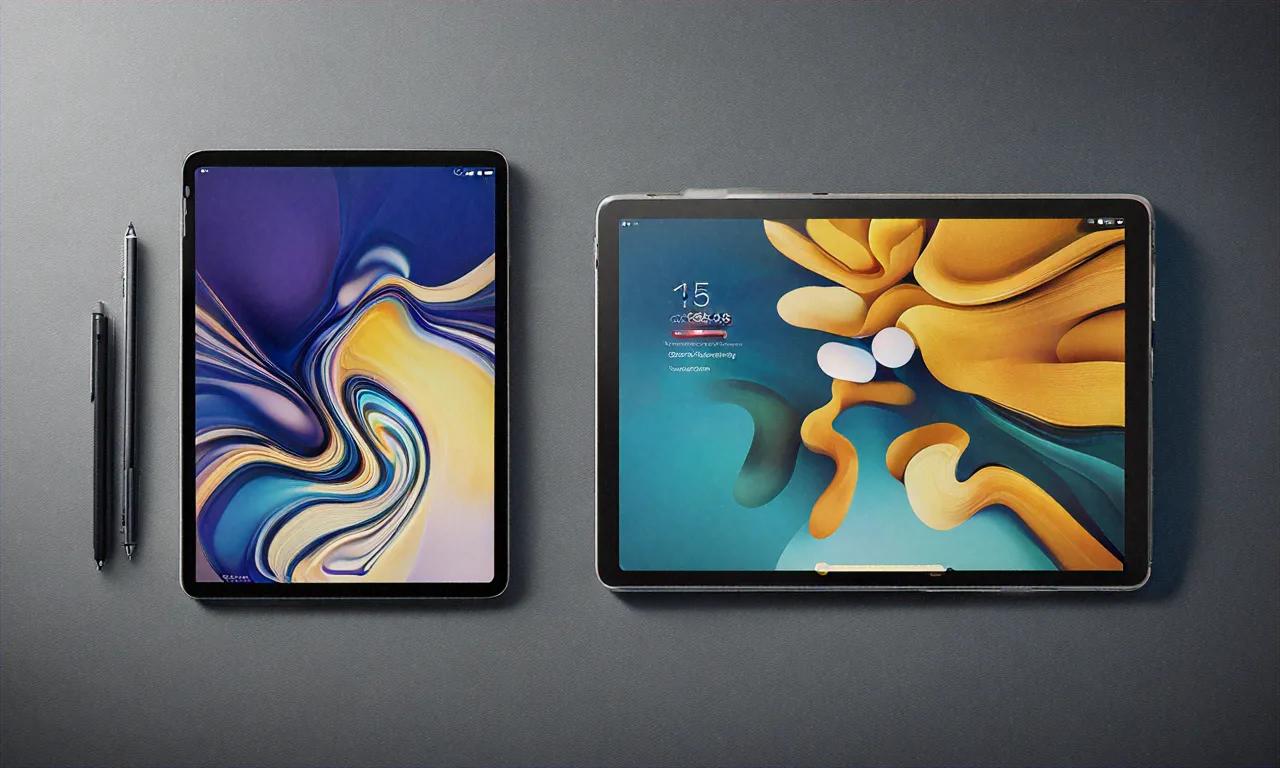
Pick almost any tablet comparison online and you'll get the same template. Specs table at the top, a paragraph under each category saying "both are good but one edges ahead," and a conclusion that picks the iPad. I've probably read twenty of them this month while testing these two tablets. Most miss the real story entirely.
The iPad Pro M4 and the Samsung Galaxy Tab S10 Ultra aren't just different tablets. They're built on completely different ideas about what a tablet should even be. Apple thinks your tablet should be a really, really polished tablet — apps made for the form factor, tight ecosystem, everything feeling intentional. Samsung thinks your tablet should try to be everything at once — a laptop, a drawing pad, a TV, a desktop workstation once you snap on a keyboard.
I've been living with both for about a month now. iPad Pro sits on my desk for design work and note-taking. Tab S10 Ultra lives on the couch for YouTube, Netflix, and the occasional DeX session when I don't feel like walking to my desk. Here's what I actually think after sustained daily use, no template required.
The Screens Tell You Everything
Apple's big display move this generation is Tandem OLED — two OLED panels stacked on top of each other. Sounds like marketing until you actually see HDR content on it. Brighter highlights, deeper blacks, and that 1,000-nit full-screen SDR brightness finally makes outdoor use workable. Every iPad before this was basically unusable in direct sunlight. Not anymore.
| iPad Pro M4 (13") | Tab S10 Ultra | |
|---|---|---|
| Size | 13 inches | 14.6 inches |
| Panel | Tandem OLED | Dynamic AMOLED 2X |
| Resolution | 2752 x 2064 (264 PPI) | 2960 x 1848 (239 PPI) |
| Peak brightness (HDR) | 1,600 nits | ~930 nits |
| Refresh rate | 10-120Hz ProMotion | 1-120Hz adaptive |
| Aspect ratio | 4:3 | 16:10 |
| Anti-reflective | Nano-texture option | Standard |
Samsung did something Apple still won't do: they made it big. 14.6 inches is wild for a tablet. First time you hold it, your brain kind of short-circuits — "this is a laptop screen without the laptop." And for watching movies? That 16:10 ratio means less letterboxing with widescreen content. A typical film fills way more of Samsung's screen while the iPad's 4:3 crops it top and bottom.
So the iPad has the objectively better panel. Sharper per inch, brighter, better HDR by a decent margin. But the Tab S10 Ultra wins the experience of watching anything widescreen on it. For documents and note-taking, though, the 4:3 ratio is genuinely better — PDFs don't feel squeezed, books look natural in portrait mode.
I keep going back and forth on which display I'd pick if forced. Probably depends on what day you ask me.
Reading on the Samsung in portrait orientation is awkward, by the way. 14.6 inches in a 16:10 ratio feels like holding a small surfboard vertically. Landscape works fine for comics — two-page spreads look great — but for books and articles, the iPad's proportions are clearly better suited.
Performance — And Whether It Actually Matters
Here's where I'll probably annoy some people. Yes, the M4 chip destroys the Snapdragon 8 Gen 3 for Galaxy. Not close on paper:
| Benchmark | iPad Pro M4 | Tab S10 Ultra | iPad advantage |
|---|---|---|---|
| Geekbench 6 single-core | ~3,800 | ~2,200 | 73% faster |
| Geekbench 6 multi-core | ~14,800 | ~7,100 | 108% faster |
| GPU (Metal vs Vulkan) | ~52,000 | ~18,000 | 189% faster |
Those GPU numbers are absurd. Nearly three times faster. The M4 is a desktop-class chip crammed into something 5.1mm thin. You can scrub through 4K timelines in Final Cut Pro, stack hundreds of Procreate layers, mix tracks in Logic Pro — the iPad barely gets warm. Samsung can't touch any of that raw output.
But here's the part most comparisons leave out: it doesn't matter for the vast majority of buyers. If you're watching Netflix, taking notes, hopping between emails and WhatsApp, browsing the web — both tablets feel identical in responsiveness. Zero perceptible lag on either one. The Tab S10 Ultra handles everything that isn't professional creative work without missing a beat.
Where M4's power becomes genuinely relevant is if you're editing video on the tablet, or you're a digital artist pushing Procreate past a hundred layers, or you produce music in Logic Pro. For everyone else? You're paying a premium for headroom you won't tap into. Not saying that's wrong — I like headroom too — just don't pick the iPad purely because of benchmark numbers unless you're actually doing that kind of heavy lifting.
Storage is worth mentioning. The Samsung has microSD expansion up to 1.5TB on top of its internal storage. iPad? You get what you bought, period. At Rs 99,900 for 256GB, that matters.
The Whole Stylus Thing
Apple Pencil Pro costs Rs 10,900. Sold separately.
The S Pen comes in the box. Free.
That framing alone shifts the conversation, but there's more to it than price.
The Apple Pencil Pro is — I'll just say it — the best stylus for serious digital art on a tablet right now. Squeeze gesture for quick tool switching is something I use constantly when drawing. Barrel roll tracks the actual angle of the pencil, which makes a real difference for calligraphy and shaped brushes in Procreate. Haptic feedback gives you a tactile click on squeeze. Hover detection shows where you're about to mark before the tip touches glass. It pairs magnetically to the iPad edge and charges wirelessly while sitting there. Slick design.
The S Pen takes a completely different approach. Less about pro art features, more about everyday usefulness. Screen-off memo is probably my single most-used feature on the Samsung — pull out the pen, scribble a quick thought without even waking the tablet. It slides into a slot inside the tablet body, so you never forget it or leave it behind. My Apple Pencil has been living in my bag's side pocket for the whole month because there's nowhere to stow it when I'm not actively drawing. Samsung Notes has gotten genuinely solid at handwriting recognition too, and write-to-text works system-wide, not just inside one app.
I tested both extensively for note-taking (Samsung Notes vs GoodNotes 6) and for art (ibisPaint vs Procreate). Writing feel is excellent on both — the S Pen's screen-off memo is more practical day-to-day, while the Apple Pencil's palm rejection and latency are fractionally better in GoodNotes. Drawing and art? Apple Pencil Pro wins clearly. Procreate plus barrel roll plus squeeze for tool access — the Android ecosystem (Clip Studio Paint, ibisPaint, Infinite Painter) simply doesn't match that combination of hardware and software polish.
Keyboard Cases and the Laptop Question
Magic Keyboard for iPad Pro: Rs 29,900. Almost thirty grand for a keyboard case. The typing experience rivals a MacBook Air, the floating cantilever design is clever, the trackpad with haptic feedback is large and responsive, USB-C passthrough port for charging while you work. It's a premium accessory in every sense — including the price.
Samsung's Book Cover Keyboard: Rs 19,999. Typing experience is noticeably less premium — less key travel, smaller trackpad, a kickstand that wobbles on your lap more than the Magic Keyboard's rigid cantilever. But paired with DeX mode, you get a taskbar, resizable floating windows, and a desktop browser. It works.
Full setup costs tell an interesting story:
| Accessory | iPad Pro | Tab S10 Ultra |
|---|---|---|
| Stylus | Rs 10,900 (Apple Pencil Pro) | Included |
| Keyboard case | Rs 29,900 (Magic Keyboard) | Rs 19,999 (Book Cover) |
| Total accessories | Rs 40,800 | Rs 19,999 |
iPad Pro base (Rs 99,900) + all accessories = roughly Rs 1,40,700. Tab S10 Ultra base (Rs 1,17,999) + keyboard = roughly Rs 1,37,998. Samsung edges ahead on total cost because the S Pen doesn't cost extra.
Funny thing though — if you skip the keyboard entirely, the iPad at Rs 99,900 is eighteen grand cheaper than the Samsung at Rs 1,17,999. Value math depends completely on what you're buying with it.
Can either actually replace a laptop? Depends on your definition of "laptop."
DeX mode is Samsung's real weapon here. Plug in the keyboard and the Tab S10 Ultra turns into something that genuinely resembles a desktop OS. Taskbar, system tray, freely resizable windows, proper file manager, desktop-class browser. For email, documents, spreadsheets, and web-based work — it holds up better than you'd expect.
Apple's Stage Manager does overlapping windows too — up to four on screen, more on an external display. It's smoother on the animation side. But Apple's approach feels more restrictive: you can't freely resize windows to any dimension, not all apps support it properly, and the experience still reads as "iPadOS pretending to be a desktop" rather than actually being one.
My honest take: for email-and-documents type work, either tablet can pull it off. For specialized software, proper file management, or multi-monitor setups — neither is there yet. If you're genuinely considering the laptop route, our MacBook Air M4 review covers the closest alternative.
Apps — Where iPad Creates Distance
This is the section that probably decides everything for a lot of people, and I think it's underweighted in most comparisons.
The iPad has Procreate. Android doesn't. That single app is reason enough for many artists.
Goes deeper than that, though. Final Cut Pro on iPad handles multiple 4K streams. Logic Pro brings real music production tools. The Affinity suite — Photo, Designer, Publisher — all run natively with touch optimization. GoodNotes and Notability for notes are better than anything on Android tablets. LumaFusion for video editing. Developer tools like Swift Playgrounds. The list of iPad-optimized professional apps is long and growing.
Samsung's side has real strengths too. Full file system access without Apple's weird sandbox restrictions. Sideload any APK you want. Game emulators run freely — RetroArch, Dolphin, whatever. Samsung's own apps (Notes, Gallery, the DeX suite) are solid. Android customization — launchers, widgets, automation with Tasker — gives you control Apple won't allow.
The real problem for the Tab S10 Ultra isn't Samsung's apps. It's that most third-party Android apps still aren't built for a 14.6-inch display. Too many of them are stretched phone layouts that look awkward at that size. Google has been pushing adaptive design and it's gotten better over the past couple years, but the gap with iPadOS tablet apps is still obvious. When you're paying over a lakh for a tablet, stretched phone interfaces sting.
Creative work = iPad. General flexibility and openness = Samsung. Neither side can fully claim the other's territory yet.
Battery, Media, and Living With Them
Battery life goes to Samsung, and it's not particularly close:
| Scenario | iPad Pro M4 (13") | Tab S10 Ultra |
|---|---|---|
| Video streaming (WiFi) | ~10 hours | ~13 hours |
| Web browsing | ~9 hours | ~11 hours |
| Note-taking (stylus) | ~8 hours | ~10 hours |
| Heavy creative work | ~5 hours | ~6 hours |
That 11,200 mAh battery gives Samsung two to three extra hours in most use cases. During long flights or marathon study sessions, that gap becomes real. Samsung charges faster too — 45W takes about 80 minutes to full. The iPad needs roughly 100 minutes with a 30W charger that Apple doesn't include in the box.
For movie watching, the Tab S10 Ultra wins. Bigger screen, widescreen-friendly aspect ratio, quad speakers that fill a room better thanks to the larger body. iPad's speakers have slightly better spatial precision, but Samsung's are louder and more immersive for casual viewing.
For reading, the iPad wins. Portrait mode on 4:3 just works better for books, articles, and PDFs. Already mentioned the surfboard situation with Samsung in portrait — it doesn't get more comfortable over time, trust me.
Pricing at a Glance
| Configuration | iPad Pro M4 | Tab S10 Ultra |
|---|---|---|
| Base | Rs 99,900 (256GB, WiFi) | Rs 1,17,999 (256GB/12GB, WiFi) |
| Mid | Rs 1,19,900 (512GB) | Rs 1,31,999 (512GB/16GB) |
| Top | Rs 1,59,900 (1TB) | Rs 1,45,999 (1TB/16GB) |
| Cellular add-on | +Rs 20,000 | +Rs 12,000 |
At base tier, iPad is cheaper by eighteen grand. At top tier, Samsung is cheaper by fourteen grand. With full accessories, Samsung is slightly cheaper overall. Without accessories, iPad wins on price. "Better value" depends entirely on what configuration you're buying and which accessories you need.
For Students
I'd lean Samsung here. S Pen is included — that's Rs 10,900 saved immediately. Samsung Notes is free and built-in, while GoodNotes costs Rs 849. The Book Cover Keyboard runs ten thousand less than the Magic Keyboard. If you're also shopping for a phone to match your tablet ecosystem, our best smartphones of 2026 roundup covers the top picks.
iPad is the premium option with better apps and a better drawing experience. But "premium" comes with premium costs at every turn, and most students have tighter budgets than they'd prefer.
Where I Landed After a Month
I've had both tablets in daily rotation for four weeks and I still don't have a confident answer. That probably tells you something about how close they are.
iPad Pro M4 is the better tablet. Better display technology, better apps for creative work, the M4 chip has power nothing else comes close to, Apple Pencil Pro is the best creative stylus available. If you draw, edit video, produce music, or design anything — just get the iPad. That part's easy.
Tab S10 Ultra is the better device, if the distinction makes sense. Bigger screen for content consumption, stylus included at no extra cost, DeX gives you a laptop-like experience that genuinely works for basic tasks, battery lasts longer, accessories add up to less money, and Android gives you fewer walls to run into.
If I had to choose one and live with it? I think I'd take the iPad Pro — maybe 55/45. The app ecosystem gap is still too big to ignore when you're spending this kind of money. But I'd miss that 14.6-inch screen every single day. Sometimes bigger just wins, and Samsung got the "bigger" part very right.
Anurag Sharma
Founder & Editor
Founder and editor of Tech Tips India. Writes hands-on tech guides, reviews, and explainers focused on the Indian context — real rupee pricing, local availability, and practical setups tested before publishing.
Stay Ahead in Tech
Get the latest tech news, tutorials, and reviews delivered straight to your inbox every week.
No spam ever. Unsubscribe anytime.
Comments (0)
Leave a Comment
All comments are moderated before appearing. Please be respectful and follow our community guidelines.
Related Articles
Home NAS Setup in India: Complete Storage Guide
Build a home NAS in India: Synology vs QNAP vs DIY, RAID configurations, TrueNAS vs OpenMediaVault, and full budget breakdown.
Best Home Projectors in India: Complete Guide
A complete guide to the best home projectors in India across budget, mid-range, and premium segments, with tips on throw distance, lumens, and room setup.
Electric vs Petrol Cars in India: Cost Compared
Electric vs petrol car cost comparison in India covering purchase price, charging, maintenance, insurance, and government subsidies.