Best Mechanical Keyboards for Coders and Gamers in 2026
A detailed guide to the top 10 mechanical keyboards available in India for programming and gaming, covering switch types, form factors, and price comparisons.
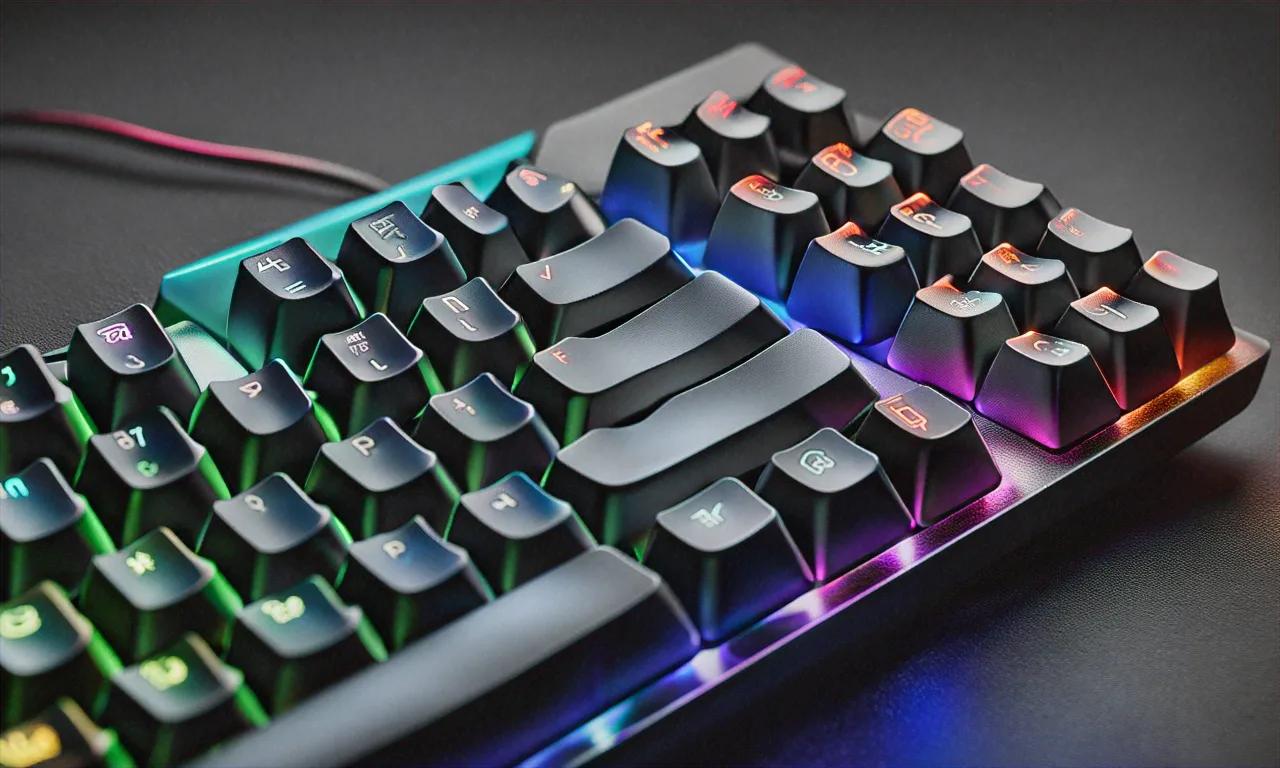
Someone on Reddit told me last week that keyboards don't matter — "it's all preference, just use whatever came with your laptop." I've been typing on mechanical boards for eight years now, and going back to a membrane keyboard feels like running through wet sand. If you code for a living or game for hours, the keyboard under your fingers matters more than your monitor. More than your mouse. I'll die on that hill.
Think about it for a second. A software developer hits somewhere between 5,000 and 10,000 keys per hour during focused coding. A competitive gamer mashes inputs hundreds of times a minute during team fights. Your keyboard is the bridge between your brain and whatever's on screen, and a mushy, imprecise bridge slows everything down. Pair a great keyboard with the right software setup — our best VS Code extensions for 2026 guide is a good companion piece — and you'll notice the difference within an hour.
Mechanical keyboards have exploded in India recently. You can spend Rs 2,500 on a budget board or Rs 25,000 on an enthusiast build. The choice overload is real: hot-swappable this, gasket-mounted that, south-facing LEDs, five-pin sockets. It gets overwhelming fast if you haven't been following the hobby.
I tested over fifteen boards in the past quarter, specifically for coding workflows and gaming performance. Here are my top ten, plus everything you need to know to pick the right one — even if you've never owned a mechanical keyboard before.
Switches — The Part That Actually Matters
Before looking at any specific keyboard, you need to understand switches. The switch is the mechanism under each keycap that registers your press. Your preference here drives the entire purchase. Three main types exist.
Linear switches travel straight down with no bump or click. Smooth, consistent feel from top to bottom. Cherry MX Red, Gateron Yellow, and Kailh Box Red are popular linears. Gamers tend to like them because the smooth travel allows faster key presses. Coders who type with a lighter touch enjoy them too.
Tactile switches have a noticeable bump partway through the press. You feel the actuation point without hearing a loud click. Cherry MX Brown, Gateron Brown, and the excellent Kailh Box Royal fit this category. A lot of programmers prefer tactiles because that bump confirms each keystroke registered — helpful when you're flying through code and need to know every input landed.
Clicky switches give you both a bump and an audible click sound. Cherry MX Blue and Kailh Box White are the classics. Deeply satisfying to type on, but your coworkers will absolutely hate you. Seriously, don't bring a clicky board into an open office. If you work from home, though, and you love that typewriter sound? Clicky switches are glorious.
| Feature | Cherry MX Red | Cherry MX Brown | Cherry MX Blue | Gateron Yellow | Kailh Box Royal |
|---|---|---|---|---|---|
| Type | Linear | Tactile | Clicky | Linear | Tactile |
| Actuation Force | 45g | 55g | 60g | 50g | 65g |
| Travel Distance | 4.0mm | 4.0mm | 4.0mm | 4.0mm | 3.6mm |
| Actuation Point | 2.0mm | 2.0mm | 2.2mm | 2.0mm | 1.8mm |
| Sound Level | Quiet | Moderate | Loud | Quiet | Moderate |
| Best For | Gaming | Coding/All-round | Typing enthusiasts | Budget gaming | Premium typing |
Form Factors — How Much Keyboard Do You Need?
Full-Size (100%): The classic with a number pad, function row, navigation cluster, arrow keys. If you use the numpad frequently — data entry, accounting, number-heavy coding — stick with this. Takes up a lot of desk space though.
TKL (80%): Drops the numpad, keeps everything else. Sweet spot for most people. Function keys, arrow keys, doesn't eat your whole desk. Most gaming and coding keyboards come in TKL.
75%: Compact layout that keeps function keys and arrows but squeezes everything closer. The Keychron Q1 popularized this, and it's become a favorite among developers who want compact without losing keys they actually use.
65%: No function row, but arrows survive. F1-F12 live on a function layer. Surprisingly usable once you adapt, and great for travel.
60%: Minimalist. No function row, no arrows, no navigation cluster. Everything through layers. Competitive gamers love them for maximum mouse space. Coders who rely on arrow keys might find the adjustment painful.
The Top 10 for 2026
1. Keychron Q1 Max — Rs 16,499
75% layout, hot-swappable Gateron Jupiter switches, gasket mount, tri-mode connectivity (Bluetooth 5.1, 2.4GHz wireless, USB-C wired), CNC-machined aluminum case.
My pick for the best all-around mechanical keyboard in India right now. The gasket mount gives it a slightly bouncy, forgiving feel that cuts fatigue during marathon coding sessions. QMK/VIA support means you can remap every single key and build custom layers — I've got Caps Lock remapped to Escape (a must if you use Vim) and a layer that turns the right side into a numpad. Hot-swappable sockets let you try different switches without soldering.
2. Logitech G Pro X TKL — Rs 13,995
TKL, hot-swappable GX switches, LIGHTSPEED wireless (1ms polling), ships with GX Brown tactile switches.
Bridges gaming and productivity well. The wireless connection is indistinguishable from wired for gaming. G Hub software lets you create per-game profiles and sync RGB across your Logitech setup. Battery runs about 40 hours with RGB off. Build quality is solid — not as premium as the Keychron Q1 Max, but reliable.
3. Royal Kludge RK84 Pro — Rs 5,499
75%, hot-swappable, tri-mode connectivity, south-facing LEDs.
This is where budget buyers should pay attention. Tri-mode wireless, hot-swappable switches, and a 75% layout for under six grand. That's wild value. Stock RK Brown switches are decent though slightly scratchy out of the box — a quick lube job transforms them. Plastic case is the obvious cost cut, but it keeps the weight down for portability. Battery lasts around 200 hours with backlighting off.
4. Razer BlackWidow V4 75% — Rs 18,999
75%, Razer Orange tactile switches, volume knob, gasket mount.
Razer's Orange switches are smoother than Cherry MX Browns with a more satisfying bump. The volume knob is genuinely handy during work. Razer Synapse integration syncs with the rest of your Razer setup if you're in that ecosystem. Per-key RGB is among the best — excellent uniformity. The gasket-mounted internals give a softer typing feel than older BlackWidow models.
5. Ducky One 3 SF — Rs 11,999
65%, Cherry MX switches (your choice), PBT double-shot keycaps, hot-swappable, gasket mount. Wired only.
Ducky has a cult following for good reason. The PBT double-shot keycap legends won't ever fade, and the texture stays grippy after months of use. The QUACK mechanics gasket mount gives it a unique feel that Ducky fans swear by. No wireless — just USB-C. For a desk setup, that's fine.
6. Keychron K8 Pro — Rs 9,899
TKL, hot-swappable Gateron G Pro switches, tri-mode wireless, QMK/VIA support.
The budget-friendly Keychron. Aluminum frame with plastic top case. Gateron G Pro switches are smooth out of the box. VIA support gives you the same remapping power as the Q1 Max. Battery is about 100 hours with backlighting off. Main downside versus the Q1 Max: tray mount instead of gasket, so it feels stiffer.
7. Corsair K70 Max — Rs 19,999
Full-size, Corsair MGX magnetic Hall effect switches, wired only.
Cutting edge. Magnetic switches never physically contact each other, so they literally won't wear out. You can adjust the actuation point from 0.4mm to 3.6mm per key. Set WASD to hair-trigger 0.4mm for gaming, bump typing keys to 2.0mm for comfortable coding. Magnetic wrist rest included. iCUE software is resource-heavy but incredibly deep.
8. Zebronics Zeb-Max Ninja Pro — Rs 2,799
TKL, Outemu Blue clicky switches, wired only, rainbow backlighting.
For the tightest budgets. It's entirely plastic, there's no hot-swap, no wireless. But it's a genuine mechanical keyboard for under three thousand rupees. Outemu Blues are clicky and satisfying. Compared to a membrane board at the same price, the typing improvement is immediate. Think of it as a gateway into the hobby.
9. Epomaker TH80 Pro — Rs 7,999
75%, hot-swappable Epomaker Flamingo linear switches, tri-mode, gasket mount, small LCD screen.
Epomaker has been quietly making excellent boards. The Flamingo switches are surprisingly smooth for a mid-range keyboard. Gasket mount provides a cushioned feel. The small LCD screen on the top right can show a clock, CPU temperature, or custom GIFs — it's a gimmick, but a fun one. VIA support for remapping.
10. Logitech MX Mechanical — Rs 14,995
Full-size, Tactile Quiet low-profile switches, Bluetooth (up to 3 devices), battery lasts 15 months.
Wait — a Logitech office keyboard on a gaming and coding list? Hear me out. If you spend eight hours coding and then don't want to game — you just want to keep typing comfortably — this might be the best keyboard here. Low-profile tactile switches need less finger travel, which genuinely reduces fatigue over long days. Pairs with three devices via Bluetooth and switches between them with dedicated buttons. Logi Options+ software does per-app customizations. Not flashy, but incredibly practical.
Price Comparison (India)
| Keyboard | Price (Rs) | Form Factor | Connectivity | Hot-Swap | Mount |
|---|---|---|---|---|---|
| Keychron Q1 Max | 16,499 | 75% | Tri-mode | Yes | Gasket |
| Logitech G Pro X TKL | 13,995 | TKL | Wireless | Yes | Plate |
| Royal Kludge RK84 Pro | 5,499 | 75% | Tri-mode | Yes | Tray |
| Razer BlackWidow V4 75% | 18,999 | 75% | Wired | No | Gasket |
| Ducky One 3 SF | 11,999 | 65% | Wired | Yes | Gasket |
| Keychron K8 Pro | 9,899 | TKL | Tri-mode | Yes | Tray |
| Corsair K70 Max | 19,999 | Full-Size | Wired | No | Plate |
| Zebronics Zeb-Max Ninja Pro | 2,799 | TKL | Wired | No | Tray |
| Epomaker TH80 Pro | 7,999 | 75% | Tri-mode | Yes | Gasket |
| Logitech MX Mechanical | 14,995 | Full-Size | Bluetooth | No | Low-profile |
Hot-Swap: Why You Probably Want It
Hot-swappable sockets let you pull out switches and swap them without soldering. In 2026, this is close to a must-have for most buyers. You can try different switches without buying a whole new board. If a single switch dies, you replace that one instead of sending the whole keyboard for repair. Modding becomes reversible — lube your switches, decide you don't like the result, put the old ones back. Hot-swappable boards also hold resale value better because the next buyer can customize them.
The only argument against: soldered connections can be slightly more stable and produce a marginally more consistent sound profile. But for 99% of users, hot-swap is the right call.
ABS vs PBT Keycaps
Your keycaps affect feel and sound more than most people realize.
ABS keycaps are cheaper and let RGB shine through beautifully, but they develop a greasy shine after a few months of heavy typing. Most stock keycaps on budget keyboards are ABS.
PBT keycaps have a textured surface that resists shine. They produce a deeper, thockier sound. PBT double-shot keycaps — where the legend is a separate piece of plastic molded into the cap — will never fade. These are what you want long-term.
If your board ships with ABS caps, consider grabbing a PBT set from Meckeys or Amazon India. Rs 1,500 to Rs 4,000 for a full set, and the upgrade is immediately noticeable.
Software Customization
QMK/VIA is the open-source standard used by Keychron, Epomaker, and most enthusiast brands. VIA runs in your browser, detects your keyboard, and lets you remap keys, build layers, and set macros with zero programming knowledge. My preferred platform because it works on every OS and doesn't install background services.
Razer Synapse is powerful but resource-heavy. Installs a background service, syncs to the cloud, and integrates across Razer products. The macro system is strong, and per-game profile switching is useful for gamers.
Logitech G Hub / Options+ are polished and relatively lightweight. Per-application customization in Options+ is great for devs — different shortcuts for VS Code, terminal, and browser.
iCUE (Corsair) is the most feature-rich and most demanding. Can control fans, coolers, RGB strips, and keyboards from one interface.
Wired vs Wireless in 2026
The debate is basically over. Modern 2.4GHz wireless keyboards deliver under 1ms latency — indistinguishable from wired even in competitive gaming. Bluetooth still sits at 7-10ms, which is fine for coding and casual gaming but noticeable in high-level competitive play.
My suggestion: get a tri-mode board (Bluetooth + 2.4GHz + USB-C) if your budget allows. Bluetooth for daily work, 2.4GHz for gaming, wired when you forget to charge. The flexibility is worth it.
Where to Buy in India
Meckeys.com — India's dedicated mechanical keyboard store. Great selection, fast shipping, enthusiast brands. Amazon India — Widest overall selection for mainstream brands. Check seller ratings. GenesisPC.in — Good for Keychron and Epomaker with reasonable pricing. Flipkart — Decent for budget options during sales. StacksKB — Curated selection with group buy options.
Pro tip: check Keychron's official India store before Amazon. Pricing is often better direct.
Back to That Reddit Comment
Remember the person who said keyboards don't matter? I get where they're coming from. If you've never typed on a good mechanical board, you don't know what you're missing, and the membrane keyboard on your desk works fine for what you're used to.
But then you try a gasket-mounted board with well-lubed tactile switches, and something shifts. Typing stops being a task and starts being... pleasant? There's a reason this hobby has millions of people spending way too much money on keyboards they don't need. Once you cross over, the membrane world looks very different from the other side.
My pick for most coders: the Keychron Q1 Max. VIA support, gasket mount, wireless — checks every box. Too pricey? The Royal Kludge RK84 Pro punches way above Rs 5,499. For gamers, the Corsair K70 Max with adjustable magnetic switches is remarkable. And if you just want to see what the fuss is about, grab that Zebronics for under three grand. Your fingers will notice the change within the first hour.
Whatever you pick, stop using that mushy membrane board. Your wrists, your accuracy, and your general enjoyment of sitting at a desk will all improve. If you're also setting up a developer workstation, our Linux for developers guide covers the rest of the tooling you'll want alongside a great keyboard. Trust me on this one.
Anurag Sharma
Founder & Editor
Founder and editor of Tech Tips India. Writes hands-on tech guides, reviews, and explainers focused on the Indian context — real rupee pricing, local availability, and practical setups tested before publishing.
Stay Ahead in Tech
Get the latest tech news, tutorials, and reviews delivered straight to your inbox every week.
No spam ever. Unsubscribe anytime.
Comments (0)
Leave a Comment
All comments are moderated before appearing. Please be respectful and follow our community guidelines.
Related Articles
Home NAS Setup in India: Complete Storage Guide
Build a home NAS in India: Synology vs QNAP vs DIY, RAID configurations, TrueNAS vs OpenMediaVault, and full budget breakdown.
Best Home Projectors in India: Complete Guide
A complete guide to the best home projectors in India across budget, mid-range, and premium segments, with tips on throw distance, lumens, and room setup.
iPad Pro M4 vs Samsung Tab S10 Ultra Compared
iPad Pro M4 vs Samsung Tab S10 Ultra: display, performance, stylus, multitasking, apps, and value for money in India.